Silver and Gold Modelling at Billions of Events a Day: Nested or Exploded?
Silver and Gold Modelling at Billions of Events a Day: Nested or Exploded?
Click to open full size.
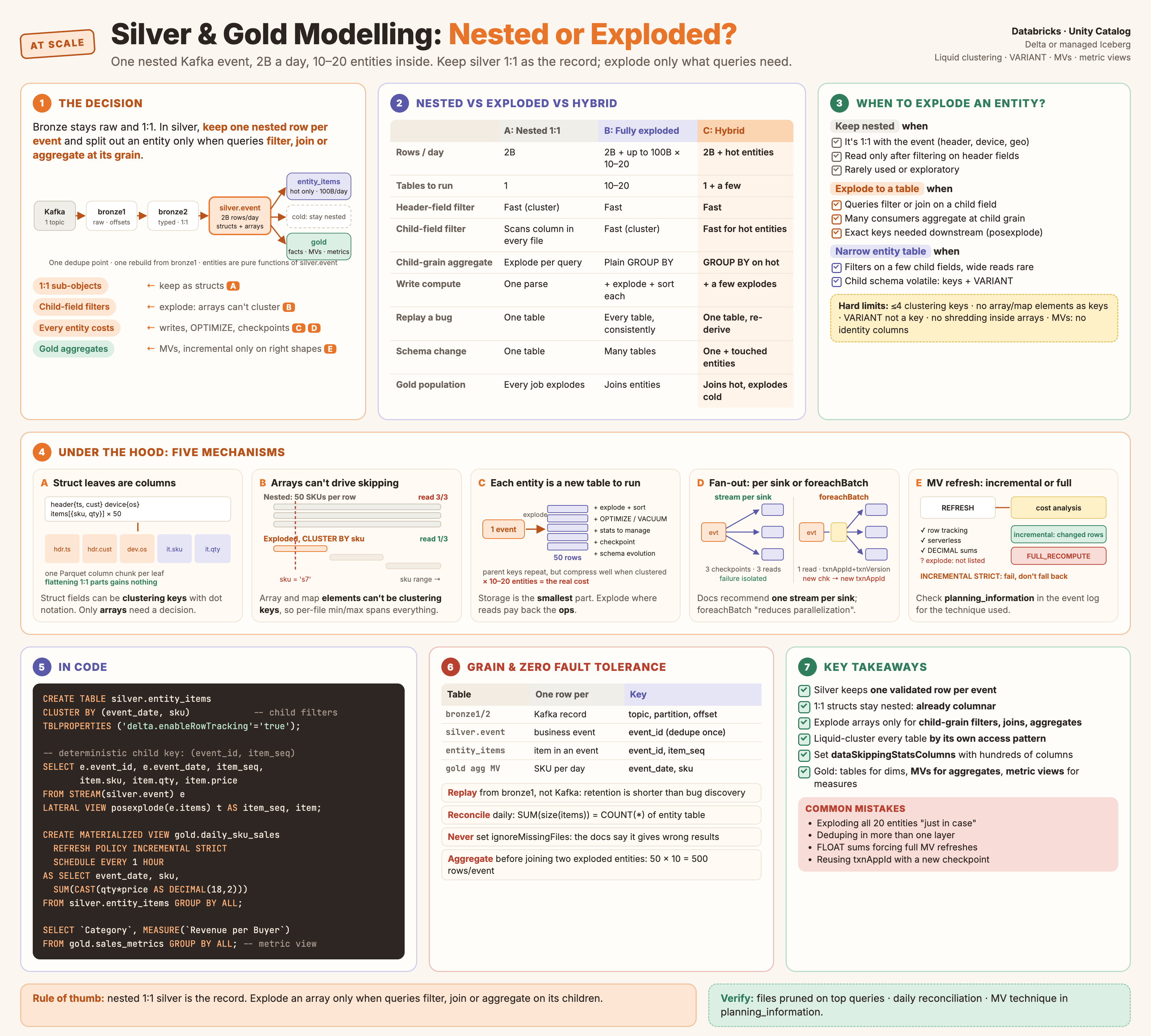
At billions of nested events a day, “keep silver nested” and “explode silver into entity tables” are both wrong as blanket rules. Keep one 1:1 nested silver table as the system of record, and explode an entity into its own table only when queries filter, join or aggregate at that entity’s grain. Two questions get mixed up here. Rows: exploding an array turns 2B rows into 100B, and row count drives sort, shuffle and join cost. Bytes: a fat sub-object costs the same whether it’s nested or flattened, but someone still has to store and rewrite it. Answer both once per entity, not once per pipeline.
The Scenario
One Kafka topic feeds the lakehouse. Every event is deeply nested: a header, a few one-to-one sub-objects, and several arrays of child objects. Fully flattened, one event holds hundreds of data points.
Illustrative figures: assumed, not measured.
| Assumption | Value |
|---|---|
| Events per day | 2 billion, one topic |
| Fields per event, fully flattened | Hundreds |
| Candidate entities inside one event | 10–20 (line items, devices, participants, …) |
| Raw volume per day | 50 TB |
| Largest 1:1 struct in silver | 4 TB/day on its own |
| Children per event, largest entity | ~50 |
| Rows per day if the largest entity is exploded | 2B × 50 = 100B |
| Fault tolerance | Zero data loss, zero duplicates, replayable |
The layers so far:
| Layer | Grain | Content |
|---|---|---|
| bronze1 | One Kafka record (topic, partition, offset) |
Untouched payload, binary or string, plus Kafka metadata |
| bronze2 | One Kafka record | Same rows, parsed and typed, still nested |
| silver | ? | The question |
The question: in silver, do you explode the arrays into 10–20 entity tables (one of them 100B rows a day), or keep 2B rows a day with the nested parts as STRUCT, ARRAY, MAP or VARIANT?
What the Docs Say, and Where They Stop
| Source says | What it means here |
|---|---|
| Bronze: store “most fields as string, VARIANT, or binary to protect against unexpected schema changes” | bronze1 is right to stay untouched |
| Silver “should always include at least one validated, non-aggregated representation of each record” | A 1:1 silver table is the documented baseline, not a shortcut |
| Silver nested data: use VARIANT, JSON strings, or structs, maps and arrays, or flatten it, or split it across normalized tables | Both of your options are documented. The docs don’t pick one |
| “Databricks does not recommend writing to silver tables directly from ingestion” | Keep the bronze hops |
| Gold is “where you’ll model your data for reporting and analytics using a dimensional model” | Gold is star schemas: facts, dimensions, aggregates |
| Large historical volumes are generally kept in silver rather than materialized in gold | Gold doesn’t need to hold 100B-row facts if silver serves them |
| The 2022 modelling blog: star schema, informational PK/FK, identity surrogate keys, Z-order, partition “sparingly” | Still sound on modelling. Its layout advice (Z-order, partitioning) is now replaced by liquid clustering |
The docs give the options. They don’t give a rule for choosing at 100B rows a day, hundreds of columns and zero tolerance for loss. The rest of this post is that rule, built from how the storage and engines actually behave.
The Three Options
flowchart LR
    K["Kafka topic"] --> B1["bronze1
raw, 1 row per record"]
    B1 --> B2["bronze2
typed, nested, 1:1"]
    subgraph A["A: nested silver"]
        SA["silver.event
2B rows/day
structs + arrays + variant"]
    end
    subgraph B["B: exploded silver"]
        SB1["silver.entity_1
100B rows/day"]
        SB2["silver.entity_2 … entity_20"]
    end
    subgraph C["C: hybrid (recommended)"]
        SC["silver.event
system of record"] --> SC1["silver.entity_hot
only hot entities"]
    end
    B2 --> SA
    B2 --> SB1
    B2 --> SB2
    B2 --> SC
| A: Nested 1:1 silver | B: Fully exploded silver | C: Hybrid | |
|---|---|---|---|
| Rows per day | 2B | 2B + up to 100B per entity × 10–20 | 2B + hot entities only |
| Tables to operate | 1 | 10–20 | 1 + a few |
| Filter on a header field | Fast (cluster on it) | Fast on the header table | Fast |
| Filter on a child field inside an array | Scans that column in every file | Fast (cluster on it) | Fast for hot entities |
| Aggregate at child grain | Explode at query time, every time | Plain GROUP BY |
Plain GROUP BY for hot entities |
| Write compute | One parse | One parse + explode + cluster per entity | One parse + a few explodes |
| Replay after a bug | Rewrite one table | Rewrite every affected table, consistently | Rewrite one table, re-derive a few |
| Schema change in the payload | One table evolves | Several tables evolve, maybe new ones appear | One table, plus the hot entities it touches |
| Gold population | Every gold job explodes | Gold joins entity tables | Gold joins hot entities, explodes the rest |
Option C is A with targeted parts of B. The rest of the post is about where to draw the line.
How It Works Underneath
Five mechanisms decide the line. Each one explains a row of the table above.
1. Nested structs are already columns
In Parquet, a struct is not a blob. Every leaf field is stored as its own column chunk, with repetition and definition levels recording where it sits in the nesting. Reading header.customer_id reads that one leaf, not the whole header. (See /parquet/spark/data-engineering/2026/10/29/Parquet-Under-The-Hood/ for the layout.)
So keeping a one-to-one part nested costs exactly what flattening it would. Flattening header.customer_id into a top-level customer_id gives the same Parquet column and the same bytes. That says nothing about whether those bytes belong in the table at all: a 4 TB/day struct is still 4 TB/day once flattened (see Fat 1:1 Sub-Objects). And liquid clustering can use a struct field directly, at any depth, with dot notation.
silver.event (one row per event)

  event_id | header.ts | header.customer_id | device.os | items: ARRAY<STRUCT<sku, qty, price>>
  ---------+-----------+--------------------+-----------+-------------------------------------
  e1       | 10:00     | c42                | ios       | [{s1,1,9.0},{s7,2,4.5}, … 50]
  e2       | 10:01     | c17                | android   | [{s3,1,2.0}, … 48]

  Parquet column chunks:  event_id | header.ts | header.customer_id | device.os | items.sku | items.qty | items.price
                          one column per leaf, even inside the array
The 1:1 parts (header, device) never need exploding: there’s nothing to explode. The rows decision is only about the arrays. Fat 1:1 parts raise a different, bytes decision, covered below.
2. Array elements can’t drive file skipping
The arrays are also stored as leaf columns (items.sku), so column pruning still works. What you lose is file skipping:
| Layout feature | Works on a struct field | Works on an array or map element |
|---|---|---|
| Liquid clustering key | Yes, with dot notation | No: “elements inside maps and arrays” are not supported |
| VARIANT as a clustering key | No: VARIANT can’t be a clustering, partition or Z-order key | No |
| Variant shredding | Top-level VARIANT and VARIANT inside structs | Not VARIANT inside arrays or maps |
A query like WHERE exists(items, i -> i.sku = 's7') on the nested table must read the items.sku column in every file of the date range. Clustering can’t help, because a file’s rows each hold 50 different SKUs.
Rule: if your important queries filter or join on a field that lives inside an array, that array is a candidate entity table. If they only read it after filtering on header fields, keep it nested.
3. Exploding multiplies rows, writes and maintenance, not just storage
Going from 2B rows to 100B rows doesn’t multiply everything by 50. Some costs follow bytes, and the child fields’ bytes are the same before and after the explode. Others follow rows, and those grow 50×.
| Cost | Follows | After exploding 2B → 100B |
|---|---|---|
| Child-field data on disk | Bytes | About the same: the same values, now one per row instead of 50 per array |
Repeated parent keys (event_id, event_ts) |
Rows | New: written 50× per event. Small when clustering keeps a parent’s children together, because runs of one value compress well |
| Number of files | Bytes | Roughly follows total bytes, not rows: files are sized by target bytes (up to 1 GB on tables over 10 TB). More files only to the extent the repeated keys add bytes |
| Per-file stats and log size | Files | Follows the file count, so mostly unchanged |
| Explode, sort and shuffle CPU | Rows | 50× more rows to generate, sort for clustering and move between executors |
| Joins and dedupe on child keys | Rows | 50× more keys to hash, shuffle and compare |
| Queries that count or aggregate children | Rows | Same rows either way: nested queries explode at read time instead |
So “100B rows means many more files” is mostly not true; the file count follows bytes. “100B rows are harder to manage” is true: everything that touches rows one by one (explode, cluster sort, MERGE, joins) gets 50× the work, on every write and every rewrite.
Storage is usually the smallest part of the bill. When an entity table is clustered by keys that keep a parent’s children together, the repeated parent columns (event_id, event_ts) become long runs of identical values, which Parquet’s dictionary and run-length encodings store compactly. The bigger costs are elsewhere:
| Cost | Nested 1:1 | Each exploded entity adds |
|---|---|---|
| Write compute | Parse once | An explode, plus a sort for clustering on write when the batch passes the size threshold |
| Maintenance | One OPTIMIZE, one stats set |
Another OPTIMIZE, VACUUM and stats set to keep up with, over a table 50× the rows |
| Streaming state | One checkpoint | Another checkpoint to protect and replay |
| Schema evolution | One table changes | A payload change can touch several tables |
| Read for header queries | Read narrow leaf columns | No benefit: header queries still go to the event table |
At 10–20 entities, fully exploding means running 10–20 high-volume tables that each need clustering, compaction and recovery. That’s the hidden cost of option B, and the reason to explode only where reads pay it back.
A cheaper middle step: the narrow entity table. Explode only the keys and the few fields people filter on (event_id, event_ts, sku, qty), clustered for those filters. Leave the full child detail nested in silver.event and join back on event_id for the rare wide read. Most of the read win, a fraction of the width.
4. Fan-out to many tables: one stream per sink, or one foreachBatch
Every entity table needs an exactly-once path from the event table. Two documented ways, with opposite trade-offs:
flowchart LR
    subgraph S["One stream per sink (Databricks' recommendation)"]
        E1["silver.event"] --> Q1["stream 1
checkpoint 1"] --> T1["entity_items"]
        E1 --> Q2["stream 2
checkpoint 2"] --> T2["entity_devices"]
        E1 --> Q3["stream 3
checkpoint 3"] --> T3["entity_parties"]
    end
    subgraph F["One foreachBatch, many writes"]
        E2["silver.event"] --> QF["stream
one checkpoint"]
        QF -->|"txnAppId + txnVersion"| U1["entity_items"]
        QF -->|"txnAppId + txnVersion"| U2["entity_devices"]
        QF -->|"txnAppId + txnVersion"| U3["entity_parties"]
    end
| One stream per sink | One foreachBatch writing all sinks |
|
|---|---|---|
| Docs position | “Databricks recommends configuring a separate streaming write for each sink” | Supported; the docs say it “reduces parallelization” |
| Reads of the event table | One per entity | One |
| Failure blast radius | One entity table falls behind; others keep going | All entities stall together |
| Exactly-once | Each checkpoint plus the Delta log | txnAppId + txnVersion let Delta “identify and ignore duplicate writes” |
| Replay one entity | Reset one checkpoint | Re-run the whole batch, duplicates skipped |
| Watch-out | N× read cost on the event table | A new checkpoint needs a new txnAppId, or Delta skips batches it thinks it has already seen |
At a few hot entities, separate streams are simpler and isolate failures. If you insist on many entities, the repeated reads of a 2B-row-a-day table are the argument for foreachBatch, and the txnAppId rule becomes part of your runbook.
def write_entities(batch_df, batch_id):
    batch_df.persist()
    for name, build in ENTITY_BUILDERS.items():          # each returns an exploded DataFrame
        (build(batch_df).write.format("delta").mode("append")
            .option("txnAppId", f"silver_entities_v3_{name}")  # change on new checkpoint
            .option("txnVersion", batch_id)
            .saveAsTable(f"silver.entity_{name}"))
    batch_df.unpersist()

(spark.readStream.table("silver.event")
    .writeStream.foreachBatch(write_entities)
    .option("checkpointLocation", "/Volumes/ops/chk/silver_entities_v3")
    .start())
5. Gold materialized views refresh incrementally only on the right shapes
Gold is where nested silver gets its final bill. A materialized view (MV) over silver is refreshed incrementally (only changed data) or fully (re-run the whole query). Databricks runs a cost analysis and picks the cheaper one, and the event log’s planning_information shows which technique it used.
| What helps incremental refresh | Source |
|---|---|
| Source Delta tables with row tracking enabled, deletion vectors recommended | MV docs |
Supported constructs: GROUP BY aggregates, WHERE, UNION ALL, inner and outer joins, window functions with PARTITION BY, QUALIFY |
Incremental refresh docs |
Cast FLOAT/DOUBLE sums and averages to DECIMAL; floating-point aggregates “can force a full refresh” |
Incremental refresh docs |
| Serverless: “Classic compute always does a full recompute” | Incremental refresh docs |
The incremental refresh docs don’t list explode or other generators. So a gold MV that explodes a 50-element array from silver.event is untested territory at 100B rows a day. Set REFRESH POLICY INCREMENTAL STRICT on it, which fails instead of silently falling back to a full recompute. If it fails, that’s your evidence the entity belongs in silver as a table.
CREATE MATERIALIZED VIEW gold.daily_sku_sales
  REFRESH POLICY INCREMENTAL STRICT
  SCHEDULE EVERY 1 HOUR
AS SELECT event_date, sku,
          SUM(CAST(qty * price AS DECIMAL(18,2))) AS revenue,
          COUNT(*)                                AS lines
   FROM silver.entity_items
   GROUP BY event_date, sku;
Two more MV limits shape gold: MVs don’t support identity columns or surrogate keys, and standalone MVs run only in triggered mode. Dimensions that need surrogate keys stay as tables.
Fat 1:1 Sub-Objects: A Bytes Problem, Not a Rows Problem
Take one 1:1 struct in silver.event that’s 4 TB a day on its own. There’s nothing to explode, and flattening it changes nothing. It’s a pure bytes problem: about 1.5 PB a year in that one column, before replication.
| Cost | Why a fat struct makes it worse |
|---|---|
| Every rewrite carries it | Clustering on write, OPTIMIZE, UPDATE, DELETE and non-insert MERGE rewrite whole files. Reclustering on a header key reads and rewrites the 4 TB too |
| Rewritten files linger | VACUUM removes unreferenced files only after the retention threshold, delta.deletedFileRetentionDuration, 7 days by default. Each rewrite pass keeps an extra copy of the struct on storage until then |
| Fewer events per file | Files are sized by bytes. When one struct is most of each row’s bytes, each file holds fewer events, so header filters touch more files |
| Wasted stats | Its leaves may take some of the first 32 stats columns, and long strings are truncated anyway |
| Reads | Free when not selected: queries that skip the struct never read its columns |
So it’s cheap to read and expensive to store and rewrite. The fix depends on who reads it:
| How the struct is read | Do this |
|---|---|
| In most queries, alongside header fields | Keep it in silver.event. Leave its leaves out of delta.dataSkippingStatsColumns. Avoid UPDATE/DELETE on the table, and lean on incremental OPTIMIZE so it’s rewritten as few times as possible |
| Rarely, or by different consumers | Split it into a 1:1 side table, silver.event_<struct>, keyed by (event_date, event_id): append-only, lightly clustered, with its own retention. silver.event gets lean and cheap to recluster. The catch: joining back on event_id at 2B rows a day is a large shuffle, so split only when that join is rare |
| Only a few of its fields are used | Copy those fields into silver.event; keep the full struct in bronze2 or the side table |
| Only for audit or replay | Leave it out of silver; read it from bronze when needed |
| Only for recent analysis | Side table with a short retention, independent of silver.event’s history |
Look inside it first. If most of the 4 TB is a few large fields (long strings, blobs, embedded payloads), splitting off or dropping just those fields does most of the work.
Map of Structs vs an Entity Table: Which Parquet Benefits Survive?
A common payload shape is a map keyed by an entity ID:
-- nested, in silver.event
parties MAP<STRING, STRUCT<role: STRING, amount: DECIMAL(18,2), country: STRING>>

-- exploded, as an entity table
silver.entity_parties (event_id STRING, event_date DATE, party_id STRING,
                       role STRING, amount DECIMAL(18,2), country STRING)
CLUSTER BY (event_date, party_id)
Same data. The question is which of the usual Parquet and Delta benefits (column pruning, predicate pushdown, compression, file skipping) still apply to the map. Short answer: you keep the ones that read less of each column, and lose the ones that skip data.
How a map is stored
Parquet stores a map as a repeated key_value group with a required key and an optional value. Every leaf becomes its own column chunk, exactly like a struct, but repeated: one value per map entry, with repetition levels marking where each row’s entries start.
Benefit by benefit
| Benefit | Map of structs | Entity table | Why |
|---|---|---|---|
| Column pruning | Yes, partly. parties['p9'].amount reads the key column and the value.amount leaf, not role or country. The key column is always read |
Yes: only the selected columns | Spark’s nested schema pruning keeps the full key type and prunes the value struct for a map lookup |
| Compression and encoding | Yes. Each leaf gets dictionary, RLE and the codec like any column. Repetition levels add a little, and parent keys aren’t repeated | Yes. Parent keys repeat per row, but clustering turns them into runs | Same Parquet encodings on every leaf. The entity table can also sort values by party_id, which a map can’t, so value columns that follow the key compress into longer runs |
| Parquet predicate pushdown (row-group min/max, dictionary, bloom filters) | No | Yes, on every column | Spark’s Parquet filter code only pushes down non-repeated primitive fields: “Map and List types are removed” |
| Delta file skipping (min/max in the log) | No. Only a null count for the whole map | Yes, on stats columns | Delta collects min/max only for numeric, date, timestamp, string and VARIANT columns. Maps and arrays aren’t eligible |
| Liquid clustering on the key or a value field | No | Yes: CLUSTER BY (event_date, party_id) |
Clustering keys can’t be map or array elements |
Lookup of a known key (p9) |
Read the key and value columns for every row in range, then look up per row | WHERE party_id = 'p9' skips files |
No skipping on map contents |
Filter on a value field across all keys (“any party with amount > 1M”) |
exists(map_values(parties), p -> p.amount > 1000000): reads that leaf everywhere |
Plain WHERE, skips files if amount has stats |
Same reason |
| Group by or join on the key | Explode first, in every query | Plain GROUP BY party_id or join |
The key isn’t a column until it’s exploded |
| Atomic with the event | Yes: event and children commit together | Separate table: needs a daily reconciliation | Nested wins |
| One value per key | Yes: Spark’s map builders fail on duplicate keys by default (spark.sql.mapKeyDedupPolicy=EXCEPTION) |
Needs a dedupe rule on (event_id, party_id) |
Nested wins |
| Variant shredding inside the value | No: VARIANT inside maps isn’t shredded | Yes, if the entity table has a VARIANT column | Shredding limitation |
What that adds up to
| You keep with a map | You lose with a map |
|---|---|
| Reading only the leaves you need (column pruning) | Everything that skips data: Parquet pushdown, Delta file skipping, clustering |
| Columnar encodings and compression | Sorting and clustering by the key |
| Atomic writes with the event, no reconciliation | Using the key as a row: GROUP BY, joins, point lookups |
| Unique keys within an event | Shredding VARIANT values |
So a map of structs is as good as an entity table for scanning and storing, and much worse for finding. At 2B events a day, “finding” means every query on a map field reads that leaf column for the whole time range.
Same answer on Iceberg
Switching the table format doesn’t rescue the map. Iceberg has the same split for the same reason: its skipping metadata needs one value per row.
| Mechanism | Delta | Iceberg |
|---|---|---|
| File-level min/max | In the Delta log, only for numeric, date, timestamp, string and VARIANT columns. A map gets a null count | In manifests (lower_bounds, upper_bounds by field ID). Iceberg’s Parquet writer drops bounds for lists and maps: “repeated fields are not currently supported” |
| Partitioning | Partition columns are top-level columns | Partition source columns “must be a primitive type and cannot be contained in a map or list, but may be nested in a struct” |
| Liquid clustering (UC managed) | No map or array elements as keys | Same rules on managed Iceberg. From external engines, partition columns become clustering keys, so the map rule above applies |
| Variant shredding | Not inside maps | Not inside maps (iceberg.enableVariantShredding has the same limitation) |
| Column pruning and compression | Yes, per leaf | Yes, per leaf: same Parquet files |
| Struct fields (not maps) | Stats, clustering keys | Bounds, partition sources, clustering keys |
The last row is the one to remember. Both formats treat struct fields as first-class columns and map entries as opaque. That’s why turning a small fixed-key map into a struct gets you everything back, on either format.
Three map shapes, three answers
| Map shape | Model it as | Why |
|---|---|---|
Small, fixed set of known keys (home, work, billing) |
A struct with named fields: addresses STRUCT<home: …, work: …, billing: …> |
It isn’t really a map. Each field becomes a non-repeated column, so pushdown, Delta stats and clustering all work again |
| Open-ended entity IDs, read only after header filters | Keep the map | Column pruning and compression are all you need |
| Open-ended entity IDs that queries filter, group or join on | Entity table, CLUSTER BY the ID |
The ID has to be a row value to be skipped on or joined |
flowchart TD
    A{"Is the key set small
and known in advance?"} -->|yes| S["Model as a STRUCT with named fields
pushdown, stats and clustering work"]
    A -->|"no: open-ended IDs"| B{"Do queries filter, group
or join on the key or a value field?"}
    B -->|no| M["Keep the MAP
pruning + compression only"]
    B -->|yes| E["Entity table
CLUSTER BY (event_date, id)"]
Choosing: map of structs or entity table
When the key set is open-ended, weigh these per map. Most maps land clearly on one side; if one row points hard at the entity table, that usually decides it.
| Question | Points to the map | Points to the entity table |
|---|---|---|
| How do queries reach the data? | Always through the event: filter on header fields, then read the map | Directly by the ID or a value field (“all events for party p9”, “amount > 1M”) |
| Is the key used as a row? | Never grouped by or joined on | GROUP BY party_id, joins to a party dimension, gold facts at party grain |
| How many consumers explode it? | One or two, occasionally | Many, on every run: one explode in silver beats one per consumer |
| Entries per event × events per day | Small maps, or a modest total row count | Explodes to tens of billions of rows a day that people query directly |
| How wide is each value struct? | Wide, and only a few fields are read | Narrow, or the read fields are worth clustering on (consider a narrow entity table) |
| Does it need to commit with the event? | Yes: no reconciliation budget, strict atomic reads | A daily count check between the tables is acceptable |
| Who reads it? | Engineers in SQL or notebooks | BI tools and metric views, where flat columns and joins are simpler to model |
| Ops budget | One more table to cluster, compact, checkpoint and replay is too much | You already run entity tables, and this one pays for itself in reads |
| Is the value schema volatile? | Keep the map, value as VARIANT if needed |
Explode only the ID and the stable fields |
Two common traps:
- Exploding “for the dashboards” when dashboards only read gold aggregates. Build the aggregate MV from a one-off explode in a job instead of a 100B-row silver table.
- Keeping the map “to save rows” when every gold job explodes it. You pay the explode CPU on every run and still get no skipping. If the map is exploded everywhere downstream, explode it once in silver.
Checking it on your own data
Run EXPLAIN FORMATTED on a map query and on the same query against the entity table:
EXPLAIN FORMATTED
SELECT event_id, parties['p9'].amount
FROM silver.event
WHERE event_date = '2026-10-30' AND parties['p9'].amount > 1000000;
| Look at | Map query | Entity-table query |
|---|---|---|
ReadSchema |
parties: map<string, struct<amount: …>>: value pruned to one field, key kept |
Only the selected columns |
PushedFilters |
Only the event_date filter; nothing on parties |
Includes party_id and amount |
| Query profile: files pruned | Only by event_date |
By event_date and party_id |
The behaviour above is from open-source Spark and Delta. On Databricks, Photon runs the scan with its own engine, so confirm with the query profile rather than assuming.
Grain: Write It Down Per Table
Every table gets one sentence: “one row per …”, and a key that enforces it. At this scale, an unstated grain is how duplicates and fan-out joins get into gold.
| Table | Grain | Unique key | Dedupe rule |
|---|---|---|---|
| bronze1.events_raw | One Kafka record | (topic, partition, offset) |
None: append only |
| bronze2.events_typed | One Kafka record | (topic, partition, offset) |
None: still 1:1 with bronze1 |
| silver.event | One business event | event_id |
First occurrence of event_id wins (producer retries create duplicate records) |
| silver.entity_items | One item within one event | (event_id, item_seq) |
Inherited from silver.event |
| gold.fact_sales_line | One sold line | (event_id, item_seq) |
Inherited |
| gold.daily_sku_sales | One SKU per day | (event_date, sku) |
Aggregate |
Two rules that matter at 100B rows:
- Carry the parent key and a position into every child row.
posexplode(orinlineplus a sequence number) givesitem_seq, so the child key is deterministic. A replay produces the same keys, and gold can reconcile. - Never join two exploded entities of the same event directly. 50 items × 10 devices is 500 rows per event. Aggregate each to the event (or a shared key) first, then join. This is the classic
1:Nfan-out, multiplied.
Table Layouts at This Scale
Clustering by access pattern
Liquid clustering is the layout for every silver and gold table here, Delta or managed Iceberg. Keys come from the filters each table actually serves. (Mechanics in /databricks/delta-lake/data-engineering/performance/lakehouse/2026/10/26/Liquid-Clustering-Under-The-Hood/.)
| Table | Typical filters | Clustering keys |
|---|---|---|
| silver.event | Time range, customer, event type | event_date, header.customer_id, event_type |
| silver.entity_items | Time range, SKU | event_date, sku |
| gold.fact_sales_line | Date + dimension keys used in joins | event_date, product_key |
| gold aggregates and MVs | Small, often scanned whole | None, or CLUSTER BY AUTO |
| Rule | Why |
|---|---|
| Up to four keys, fewer on tables under 10 TB | More keys can slow single-column filters on smaller tables |
| Correlated columns: keep one | event_ts and event_date cluster the same way |
| Low-cardinality column you always filter on | Use hierarchical clustering: low-cardinality columns first, high-cardinality ones as standard keys |
| Keys must have statistics | By default only the first 32 columns get them. With hundreds of nested leaves, set delta.dataSkippingStatsColumns to the filter columns explicitly, and put clustering keys in it |
| Exclude long strings from stats | They’re truncated during collection; leave rarely filtered ones out |
CLUSTER BY AUTO on UC managed tables |
Databricks picks and adapts keys from query history (needs predictive optimization) |
File sizes
| Table size | Autotuned target file size |
|---|---|
| Under 2.56 TB | 256 MB |
| 2.56 TB to 10 TB | Scales linearly up to 1 GB |
| Over 10 TB | 1 GB |
At 100B rows a day an entity table passes 10 TB quickly. Existing files aren’t re-optimized when the target grows, so expect a mix of sizes in older data. Don’t repartition(n) or coalesce(n) right before the write; let optimized writes and clustering size the files.
Delta or Iceberg
| Need | Delta (UC managed) | Iceberg (UC managed) |
|---|---|---|
| Liquid clustering | Yes | GA on Runtime 16.4 LTS+ |
Deletion vectors, row tracking, row-level concurrency, CLUSTER BY AUTO |
Yes | Iceberg v3 on Runtime 18.0+; not on v2 |
| VARIANT with shredding | delta.enableVariantShredding |
iceberg.enableVariantShredding |
| MV incremental refresh as a source | Yes | Managed Iceberg v2 and v3: yes. Foreign Iceberg: read, but full refresh only |
| External engines writing | Delta clients | Iceberg clients; their partition columns become clustering keys |
Pick by who else reads and writes the tables. The modelling decision is the same in both.
VARIANT for the volatile parts
Use typed structs for the parts of the payload with a stable schema, and VARIANT for the parts that change often or vary by event type. Databricks recommends VARIANT over JSON strings for semi-structured data.
STRUCT / ARRAY |
VARIANT |
|
|---|---|---|
| Schema | Fixed; evolution is a table change | Flexible; new fields need no DDL |
| Clustering key | Struct fields: yes | No |
| Shredding | Not needed: already columnar | Common fields stored as separate Parquet columns (Runtime 17.3+, on by default for CREATE TABLE; stats and skipping best on 18.1+) |
Comparisons, GROUP BY, ORDER BY |
Yes | Not on the VARIANT itself; extract and cast the field first |
| Path case | Case-insensitive | Case-sensitive: v:Sku and v:sku differ |
Shredding doesn’t apply to VARIANT inside arrays or maps. A volatile array of children is a stronger candidate for exploding, or for an entity table with a VARIANT column per child.
Gold: Facts, MVs and Metric Views
Gold is a dimensional model. The choice is how each gold object is built and kept fresh.
| Gold object | Build it as | When |
|---|---|---|
| Conformed dimension with surrogate key | Table with an identity column, MERGE for slowly changing attributes |
Always a table: MVs don’t support identity columns or surrogate keys |
| Line-level fact (child grain) | Table or streaming table from the silver entity table | Child grain is queried directly and it’s large |
| Line-level fact, low use | View over the silver entity table | Large history stays in silver; don’t copy 100B rows to gold for occasional reads |
| Aggregates (daily, weekly) | Materialized view, INCREMENTAL STRICT |
Shapes the incremental engine supports, from row-tracked sources |
| Business metrics (revenue, conversion, ratios) | Unity Catalog metric view over facts and dimensions | One definition, any grain, any tool |
Metric views: define the measure once
A plain view fixes its aggregation and grouping when you create it. A metric view separates measures from the fields you group and filter by, and the engine generates the correct aggregation at query time. Ratios and distinct counts stay right at any grain, because they’re recomputed, not re-summed.
CREATE OR REPLACE VIEW gold.sales_metrics
WITH METRICS
LANGUAGE YAML
AS $$
version: 1.1
source: gold.fact_sales_line
joins:
  - name: product
    source: gold.dim_product
    on: source.product_key = product.product_key
fields:
  - name: Event Date
    expr: event_date
  - name: Category
    expr: product.category
measures:
  - name: Revenue
    expr: SUM(revenue)
  - name: Buyers
    expr: COUNT(DISTINCT customer_key)
  - name: Revenue per Buyer
    expr: SUM(revenue) / COUNT(DISTINCT customer_key)
$$;

SELECT `Category`, MEASURE(`Revenue per Buyer`) AS rpb
FROM gold.sales_metrics
WHERE `Event Date` >= '2026-10-01'
GROUP BY ALL;
Joins live in the YAML, not in the query. Metric views can also materialize pre-computed aggregations and rewrite queries to use them; that feature is marked experimental, so treat it as a performance layer, not the only copy of a number.
How gold populates from each silver option
flowchart TD
    SE["silver.event
nested, 1:1"] -->|"header grain:
plain select"| GF1["gold.fact_event"]
    SE -->|"hot entity:
stream + posexplode"| SI["silver.entity_items"]
    SI --> GF2["gold.fact_sales_line"]
    SE -->|"cold entity:
explode in a view or batch job"| GC["gold.cold_entity_report"]
    D["gold.dim_* tables
identity surrogate keys"] --> GF1
    D --> GF2
    GF2 --> MV["gold MVs
INCREMENTAL STRICT"]
    GF1 --> MET["metric views"]
    GF2 --> MET
Zero Fault Tolerance at Billions a Day
The docs cover exactly-once streaming into Delta. They don’t cover what it takes to keep 20 tables consistent through bugs, replays and schema changes. These are the rules that do.
| Risk | Control |
|---|---|
| Kafka retention is shorter than your bug discovery time | bronze1 is the replay source, not Kafka. Keep it append-only, untouched, with topic, partition, offset and Kafka timestamp |
| Producer retries create duplicates | Dedupe once, in silver.event, on event_id. Entity tables inherit; never dedupe twice with different rules |
| A job writes twice after a crash | Streaming checkpoint plus the Delta log gives exactly-once per sink; txnAppId/txnVersion for foreachBatch |
| New checkpoint silently skips data | With foreachBatch, a new checkpoint needs a new txnAppId. Version it with the checkpoint path |
| Source files expire before a stream catches up | The query fails and needs a full refresh. Don’t set spark.sql.files.ignoreMissingFiles to work around it: the docs say it gives incorrect results |
| Entity tables drift from the event table | Reconcile per day: SUM(size(items)) in silver.event equals COUNT(*) in silver.entity_items |
| A parsing bug corrupts history | Fix bronze2 logic, rebuild silver.event for the affected range from bronze1, re-derive entities. Deterministic keys (event_id, item_seq) make the rebuild idempotent |
| Schema change in the payload | New fields land in VARIANT parts with no DDL. Promote to typed struct fields deliberately, with a backfill |
The hybrid model makes every one of these cheaper: there’s one dedupe point, one table to rebuild from bronze, and entity tables are pure functions of it.
When to Explode an Entity
Decide per entity, using what queries do with it.
| Situation | Choice | Why |
|---|---|---|
| 1:1 sub-object (header, device, geo) | Keep as struct in silver.event |
Leaves are already columns; struct fields can be clustering keys |
| Fat 1:1 sub-object, rarely read | 1:1 side table keyed by (event_date, event_id) |
Bytes, not rows: keeps it out of every rewrite of silver.event |
| Array read only after filtering on header fields | Keep nested | Column pruning reads only the leaf columns needed |
| Array filtered or joined on a child field | Explode to a silver entity table | Array elements can’t be clustering keys, so nested means scanning that column everywhere |
| Aggregated at child grain by many consumers | Explode, then MV aggregates on top | One explode instead of one per consumer; MV refreshes incrementally from a row-tracked table |
| Filtered on a few child fields, read wide rarely | Narrow entity table, join back on event_id |
Read win without duplicating the full child width |
| Rarely used, exploratory | Keep nested; explode in a gold view or ad-hoc | Not worth a 100B-row table and its maintenance |
| Volatile child schema | Keep as VARIANT, explode only keys |
Avoids DDL churn; VARIANT inside arrays isn’t shredded |
| Needed with exact counts or keys downstream | Explode with posexplode |
Deterministic (event_id, item_seq) for reconciliation |
Hard limits that force the choice
- Liquid clustering: up to four keys; no struct, map or array columns as keys, and no elements inside maps or arrays.
VARIANT: not a clustering, partition or Z-order key; no comparisons, grouping, ordering or set operations on the VARIANT itself.- Variant shredding: not for VARIANT inside arrays or maps.
- Materialized views: no identity columns or surrogate keys; incremental refresh needs serverless.
flowchart TD
    A{"Is it 1:1 with the event?"} -->|yes| S["Keep as struct in silver.event"]
    A -->|"no: it's an array"| B{"Do important queries filter
or join on a child field?"}
    B -->|no| C{"Aggregated at child grain
by many consumers?"}
    C -->|no| N["Keep nested
explode in gold views when needed"]
    C -->|yes| E
    B -->|yes| D{"Do they read most child fields?"}
    D -->|yes| E["Full entity table in silver
CLUSTER BY child filter keys"]
    D -->|no| W["Narrow entity table
keys + filter fields, join back on event_id"]
    E --> G["Gold MVs on top
INCREMENTAL STRICT"]
    W --> G
Checking It Works
- Reconcile row counts daily.
SUM(size(items))perevent_dateinsilver.eventmust equalCOUNT(*)perevent_dateinsilver.entity_items, andCOUNT(DISTINCT event_id)must equalCOUNT(*)insilver.event. - Check file skipping on the top queries. In the query profile, compare files read with files pruned. A child-field filter on the nested table that reads every file is your signal to explode that entity.
- Check MV refresh technique. Query the pipeline event log for
planning_informationevents. Anything you expected to be incremental showingFULL_RECOMPUTEneeds a fix, orINCREMENTAL STRICTto make it fail loudly. - Check layout.
DESCRIBE DETAILshows clustering keys; confirm the keys are indelta.dataSkippingStatsColumnswhen the table has hundreds of columns.
Sources
- Data Modeling Best Practices & Implementation on a Modern Lakehouse, Databricks blog, 20 October 2022 (star schema, informational PK/FK, identity surrogate keys, Z-order and sparing partitioning)
- What is the medallion lakehouse architecture?, Databricks documentation (bronze, silver, gold contents; nested data options in silver; gold as a dimensional model; large history in silver)
- Query variant data and Variant vs JSON strings, Databricks documentation (VARIANT limits, recommendation over JSON strings, case-sensitive paths)
- Use variant shredding, Azure Databricks documentation, updated 11 September 2026 (shredding requirements, defaults, Delta and Iceberg properties, array and map limitation)
- Use liquid clustering for tables, Databricks documentation (key types, struct fields with dot notation, four-key limit, hierarchical clustering, clustering on write thresholds,
CLUSTER BY AUTO, managed Iceberg support) - Data skipping, Databricks documentation (first 32 columns,
delta.dataSkippingStatsColumns, string truncation, predictive optimization stats) - VACUUM, Databricks documentation (7-day default retention,
delta.deletedFileRetentionDuration) - Control data file size, Databricks documentation (autotuned file sizes, optimized writes, auto compaction)
- Delta table streaming reads and writes, Databricks documentation (exactly-once, one stream per sink,
txnAppId/txnVersion, checkpoint andignoreMissingFileswarnings) - Materialized views and Incremental refresh for materialized views, Databricks documentation (row tracking, serverless, supported constructs,
DECIMALcasting, refresh policy,planning_information, no identity columns) - Unity Catalog metric views, Create a metric view, Metric view YAML syntax and Materialization for metric views, Databricks documentation (measures vs fields,
MEASURE(), YAML v1.1, joins, experimental materialization) - Parquet logical types: MAP and LIST, Apache Parquet format spec (map stored as a repeated
key_valuegroup with a required key) - Delta transaction log protocol: per-file statistics and Delta source
DataSkippingReader.scala(SkippingEligibleDataType: min/max only for numeric, date, timestamp, string and VARIANT) - Apache Iceberg table spec (manifest
lower_bounds/upper_boundsby field ID; partition source columns cannot be in a map or list) and Iceberg sourceParquetMetrics.java(no bounds for list and map fields) - Apache Spark source:
ParquetFilters.scala(pushdown only for non-repeated primitive fields; map and list removed),SelectedField.scala(nested pruning through map lookups keeps the key type),SQLConf.scala(spark.sql.mapKeyDedupPolicy, defaultEXCEPTION) - Parquet nested encoding, Apache Parquet documentation (structs and arrays stored as leaf columns with repetition and definition levels)