Liquid Clustering in Databricks: What It Is, How It Works, When to Skip It
Liquid Clustering in Databricks: What It Is, How It Works, When to Skip It
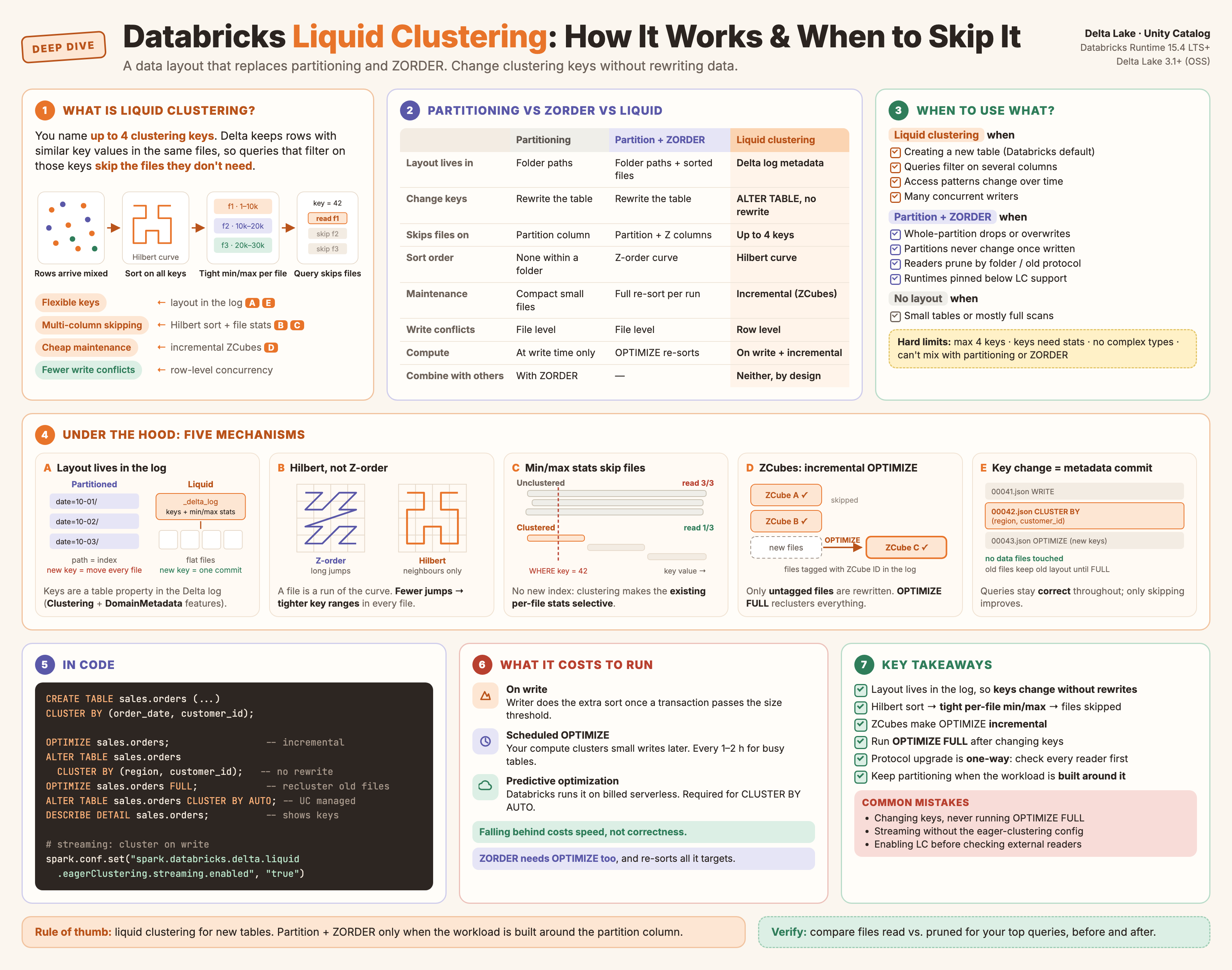
Click to open full size.
Liquid clustering is a Delta Lake data layout technique that replaces partitioning and ZORDER. You name up to four clustering keys, Delta keeps rows with similar key values in the same files, and queries that filter on those keys skip the files they don’t need. Unlike partitioning, you can change the keys later without rewriting existing data.
Databricks now recommends it for all new tables. This post covers what it gives you, how it does it underneath, and when something else is the better fit.
What You Get
| Benefit | What it means in practice |
|---|---|
| Flexible keys | ALTER TABLE … CLUSTER BY changes the keys. Existing files are not rewritten. |
| Multi-column skipping | Up to four keys, clustered together, so filters on any of them can skip files. |
| Incremental maintenance | OPTIMIZE rewrites only data that isn’t clustered yet, not the whole table. |
| No partition sizing | No guessing a partition column that gives “not too many, not too few” directories. |
| Fewer write conflicts | Row-level concurrency lets concurrent writers touch the same files. |
| Optional autopilot | CLUSTER BY AUTO picks keys from query history on Unity Catalog managed tables. |
CREATE TABLE sales.orders (
  order_date  DATE,
  region      STRING,
  customer_id BIGINT,
  amount      DECIMAL(18,2)
)
CLUSTER BY (order_date, customer_id);

OPTIMIZE sales.orders;                                -- incremental recluster
ALTER TABLE sales.orders CLUSTER BY (region, customer_id);  -- change keys, no rewrite
ALTER TABLE sales.orders CLUSTER BY AUTO;             -- let Databricks choose (UC managed)
DESCRIBE DETAIL sales.orders;                         -- shows current clustering keys
How It Works Underneath
Five mechanisms deliver those benefits. Each one is simple; together they remove the need for a physical directory layout.
1. The layout lives in the transaction log, not in folders
A partitioned table encodes its layout in directory paths. The path is the index, so changing the partition column means moving every file.
A clustered table has a flat set of files. The clustering keys are a table property recorded in the Delta transaction log (the Clustering and DomainMetadata table features). Changing the keys is a metadata commit: no file moves.
flowchart LR
    subgraph P["Partitioned: layout = directory paths"]
        direction TB
        P1["order_date=2026-10-01/"] --> PF1["part-000.parquet"]
        P2["order_date=2026-10-02/"] --> PF2["part-000.parquet"]
        P3["order_date=2026-10-03/"] --> PF3["part-000.parquet"]
    end
    subgraph L["Liquid: layout = log metadata"]
        direction TB
        LOG["_delta_log
clustering keys: order_date, customer_id
per-file min/max stats"] --> LF["flat data files
f001 · f002 · f003 · ..."]
    end
2. A space-filling curve orders rows across several columns
To keep rows close on several columns at once, Delta maps each row’s key values onto a single position along a space-filling curve, then sorts by that position and cuts the sorted stream into files. Delta Lake’s default curve for liquid clustering is the Hilbert curve, which replaces the Z-order curve used by ZORDER.
The difference matters. Both curves visit every cell of the key space, but the Z-order curve makes long jumps, while the Hilbert curve only ever steps to a neighbouring cell:
Because a file is a contiguous stretch of the curve, fewer jumps means each file’s rows fall in a tighter range on every key. That’s what makes the next step work.
3. Data skipping uses per-file min/max statistics
Every file added to a Delta table carries statistics in the transaction log: row count, null counts, and min and max values per column (for the first 32 columns by default). At query time Delta compares the filter to each file’s min/max range and never opens files that can’t match.
Clustering doesn’t add a new index. It makes the existing statistics selective, by shrinking each file’s min/max range:
Unclustered (arrival order)          Clustered on customer_id
file   customer_id min..max          file   customer_id min..max
f001   3 ........... 9,998,112       f001   1 ........ 10,000
f002   1 ........... 9,999,870       f002   10,001 .... 20,000
f003   7 ........... 9,997,455       f003   20,001 .... 30,000

WHERE customer_id = 42               WHERE customer_id = 42
→ every range contains 42            → only f001's range contains 42
→ open every file                    → skip the rest
sequenceDiagram
    participant Q as Query (WHERE customer_id = 42)
    participant L as Delta log
    participant S as Object storage
    Q->>L: list files + min/max stats
    L-->>Q: f001 [1..10000], f002 [10001..20000], ...
    Note over Q: keep files whose range can contain 42
    Q->>S: read f001 only
    S-->>Q: matching rows
This is also why every clustering key needs statistics collected, and why complex types (struct, map, array) can’t be keys.
4. Incremental clustering with ZCubes
ZORDER re-sorts all the data it’s pointed at, every time. Liquid clustering avoids that with ZCubes: a ZCube is a group of files with Hilbert-clustered data produced by one OPTIMIZE run. Each clustered file is tagged with its ZCube ID in the Delta log. The next OPTIMIZE reads those tags and rewrites only files that aren’t in a ZCube yet.
flowchart LR
    subgraph T["Table files before OPTIMIZE"]
        direction TB
        Z1["ZCube A
(tagged, clustered)"]
        Z2["ZCube B
(tagged, clustered)"]
        U["new files
(untagged, arrival order)"]
    end
    U -->|"OPTIMIZE picks only untagged files"| O["Hilbert sort
+ rewrite"]
    O --> Z3["ZCube C
(tagged, clustered)"]
    Z1 -.->|"left alone"| K["unchanged"]
    Z2 -.->|"left alone"| K
The trade-off is deliberate: each ZCube is well clustered internally, but ZCubes overlap with each other on key ranges. Write cost stays low, at the price of a layout that’s slightly less tight than a full re-sort. OPTIMIZE … FULL closes the gap by reclustering everything; use it after changing keys or enabling clustering on an existing table.
Writes can also cluster data as it lands. On Databricks, INSERT INTO, CTAS, COPY INTO and batch appends cluster on write once a transaction passes a size threshold; streaming writes need spark.databricks.delta.liquid.eagerClustering.streaming.enabled = true. Anything smaller lands unclustered and waits for OPTIMIZE.
5. Changing keys is a metadata commit
Because the layout is a property in the log (mechanism 1) and maintenance is incremental (mechanism 4), changing keys is cheap:
sequenceDiagram
    participant U as You
    participant L as Delta log
    participant O as OPTIMIZE
    U->>L: ALTER TABLE ... CLUSTER BY (region, customer_id)
    Note over L: new commit: clustering keys updated
no data files touched
    O->>L: next run reads new keys
    O->>O: clusters new and unclustered files on (region, customer_id)
    Note over O: old files keep their old layout
until OPTIMIZE FULL
The catch: old files stay clustered on the old keys until you run OPTIMIZE … FULL. Queries stay correct either way; only skipping effectiveness changes.
Bonus: row-level concurrency
On Databricks, clustered tables get row-level concurrency: with deletion vectors and row tracking enabled, conflicting writes are detected at the row level rather than the file level. Two writers updating different rows in the same file no longer conflict. Turn off either feature and you lose this.
How the Pieces Fit
flowchart TD
    W["Writes
(batch, streaming, MERGE)"] -->|"above size threshold"| CW["cluster on write"]
    W -->|"below threshold"| UF["unclustered files"]
    CW --> TBL["Delta table
keys + per-file stats in the log"]
    UF --> TBL
    TBL --> OPT["OPTIMIZE (scheduled or predictive)
rewrites only untagged files → new ZCube"]
    OPT --> TBL
    TBL --> R["Reads
min/max stats skip files"]
    AUTO["CLUSTER BY AUTO
(UC managed tables)"] -.->|"picks / changes keys from query history"| TBL
When Something Else Fits Better
Liquid clustering is the default choice for new tables, but not the only one.
| Situation | Better fit | Why |
|---|---|---|
| Small tables, or queries that mostly scan everything | No layout at all | Skipping only helps when filters can rule out files. |
| No stable filter columns | No layout, or revisit later with CLUSTER BY AUTO |
Keys chosen by guesswork don’t skip anything. |
| Iceberg tables outside Databricks | Iceberg sort orders / Z-order rewrites | Liquid clustering is a Delta Lake feature; Iceberg engines use their own layout tools. |
| The workload is built around the partition column, or constrained from outside Databricks | Partitioning + ZORDER |
See below. |
Two hard rules: liquid clustering can’t be combined with partitioning or ZORDER on the same table, and keys are limited to four columns. Highly correlated columns (say, order_date and order_timestamp) only need one key.
When partition + ZORDER still wins
| Case | Why partition + ZORDER wins |
|---|---|
Whole-partition lifecycle operations (drop old days, overwrite a day with replaceWhere) |
When the condition matches whole partitions, Delta removes or swaps those files in the log, with no data rewrite. On a clustered table the same delete or overwrite may rewrite files or write deletion vectors, depending on how file ranges line up with the condition. |
| Partitions stop changing once written (yesterday’s data never changes) | Run ZORDER once per partition when it closes, then never again. A bounded, one-off cost, and ZORDER’s weakness (re-sorting repeatedly) never comes up. |
| Readers outside Databricks rely on folder-based pruning, or can’t read the newer protocol | Older Hive-style engines only skip data by directory (date=…/). Clustered tables need writer v7 and (on Databricks) reader v3, and the protocol can’t be downgraded. |
| Pinned older runtimes (or OSS Delta below 3.1) | Liquid clustering needs a recent runtime; enabling it on an existing OSS table needs Delta 3.3+. ZORDER works almost everywhere. |
| A stable setup that already works (always date + one column, access patterns never change) | Migrating costs a protocol upgrade, a full recluster and re-testing jobs. Changeable keys are worth nothing if you never change them. |
What these cases share: the workload is built around the partition column, or something outside Databricks constrains the table. Without those constraints, liquid clustering is the better default.
flowchart TD
    A{"Do queries filter on
stable columns?"} -->|no| N["No layout
(or try CLUSTER BY AUTO later)"]
    A -->|yes| B{"Can every reader and writer
handle the clustering protocol?"}
    B -->|no| Z["Stay on partitioning / ZORDER
until they're upgraded"]
    B -->|yes| P{"Built around whole-partition
drops or overwrites?"}
    P -->|yes| PZ["Partition by that column
ZORDER once per closed partition"]
    P -->|no| C{"New table?"}
    C -->|yes| LC["CREATE TABLE ... CLUSTER BY
or CLUSTER BY AUTO"]
    C -->|no, existing| M["ALTER TABLE ... CLUSTER BY
then OPTIMIZE FULL"]
What It Costs to Run
Liquid clustering is not free: the rows have to be sorted along the Hilbert curve somewhere, and that takes compute in one of three places.
- Clustering on write. The writing job does the extra sort when a transaction passes the size threshold. Write jobs use somewhat more CPU.
OPTIMIZEjobs. Small writes, and streams without the eager-clustering config, land unclustered. A scheduledOPTIMIZEon your own compute clusters them later.- Predictive optimization /
CLUSTER BY AUTO. Databricks runsOPTIMIZEfor you on billed serverless compute.CLUSTER BY AUTOrequires predictive optimization.
Two things keep this in perspective:
- It costs speed, not correctness. If clustering falls behind, queries still return the right rows; they just skip fewer files until
OPTIMIZEcatches up. ZORDERcosts compute too, usually more. It’s also anOPTIMIZEjob, and it re-sorts all the data it targets every run. Only plain partitioning (withoutZORDER) has no ongoing maintenance compute, because its layout is fixed when data is written, but it only skips on the partition column.
| Layout | Compute when writing | Ongoing maintenance |
|---|---|---|
| Partitioning only | Small: rows are split by partition on write | None, apart from compacting small files |
Partition + ZORDER |
Same as above | OPTIMIZE … ZORDER BY fully re-sorts each targeted partition: run it once per closed partition, or keep re-running it |
| Liquid clustering | Extra sort when clustering on write | Incremental OPTIMIZE, by you or by predictive optimization on billed serverless compute |
Checking It Works
DESCRIBE DETAIL <table>shows the clustering keys.- Run your top queries before and after, and compare files read and files pruned in the query profile.
- Keep
OPTIMIZErunning (every one to two hours for busy tables, or let predictive optimization do it, not both).
Sources
- Use liquid clustering for tables, Databricks documentation
- Use liquid clustering for Delta tables, Delta Lake documentation
- Delta Lake 3.2 release, Delta Lake blog (Hilbert curve and ZCubes)
- Delta transaction log protocol (per-file statistics, table features)