Parquet Under the Hood: How a Query Reads Less
Parquet Under the Hood: How a Query Reads Less
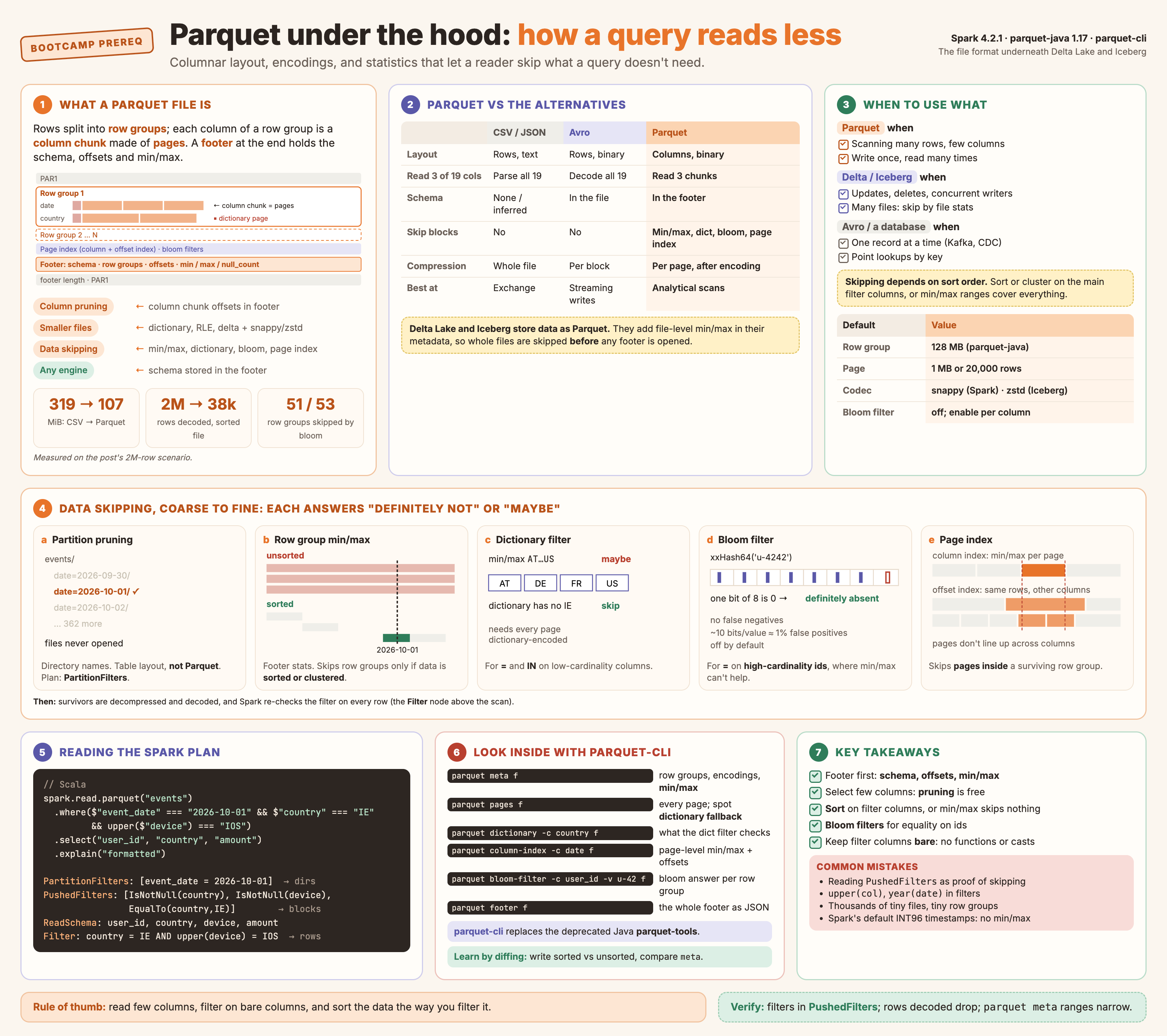
Click to open full size.
Parquet stores a table column by column and writes statistics about every block it writes. A reader uses those statistics to skip whole blocks without decoding them, then reads only the columns the query asks for. Delta Lake and Apache Iceberg both store their data as Parquet files, so everything in this post is also how they read data. They add a layer on top, covered at the end.
This is a prerequisite post for the bootcamp series. Later posts on Delta, Iceberg and liquid clustering build on the terms defined here: row group, column chunk, page, footer, min/max statistics and predicate pushdown.
The Scenario
One query, run against the same data stored in different ways.
SELECT user_id, country, amount
FROM   events
WHERE  event_date = DATE '2026-10-01'
AND    country    = 'IE'
| Assumption | Value |
|---|---|
| Table | events: 2 million rows over one year (2026), 19 columns |
| Columns read | 3 of 19, plus the filter columns |
| Matching rows | 280 (one day of 365, one country of 20) |
| Engine | Spark 4.2.1 (writes with parquet-java 1.17.0), local mode, Scala spark-shell |
| Layouts compared | CSV; Parquet unsorted; Parquet sorted by event_date, country; Parquet partitioned by event_date |
| Row group size | Lowered to 4 MB (parquet.block.size) so one file has 53 row groups to skip between |
The table is small enough to run on a laptop. Every number and plan in this post comes from running the script at the end on that data.
| Layout | Size on disk | Rows Spark decoded | Rows returned | What did the work |
|---|---|---|---|---|
| CSV | 319 MiB | every line (all 319.5 MiB read) | 280 | Nothing: no columns or blocks to skip |
| Parquet, unsorted | 107 MiB | 2,000,000 | 280 | Column pruning only. Every row group spans the whole year |
| Parquet, sorted, pushdown off | 156 MiB | 2,000,000 | 280 | Column pruning only (spark.sql.parquet.filterPushdown=false) |
| Parquet, sorted | 156 MiB | 38,440 | 280 | Min/max kept 2 of 53 row groups; the page index kept 1 page in each |
| Parquet, partitioned by date | 151 MiB in 365 files | 5,522 | 280 | Partition pruning opened 1 file of 365 |
Measured on a laptop with Spark’s task input metrics (recordsRead). Spark’s input byte counter gave inconsistent numbers for the Parquet runs on a local disk (pushdown off reported fewer bytes than pushdown on), so bytes are only shown for CSV. The sorted file is larger than the unsorted one because it also carries 53 MB of bloom filters; section 3d explains why.
The same 3 columns and the same rows come back each time. What changes is how much of the file the reader has to touch to find them.
What You Get
| Benefit | What it means in practice | Mechanism |
|---|---|---|
| Column pruning | A query that reads 3 of 19 columns skips the other 16 column chunks entirely | Values stored by column, located by byte offset in the footer |
| Smaller files | Repeated and similar values shrink before the codec even runs | Dictionary, run-length and delta encodings, then snappy or zstd |
| Data skipping | Blocks whose statistics can’t match the filter are never read | Min/max, null counts, dictionaries, bloom filters, page index |
| Self-describing | Any engine can read the file with no external schema | Schema and types stored in the footer |
| Parallel reads | One large file is read by many tasks at once | Row groups are independent units with known offsets |
| Fast vectorized decoding | Values of one type sit together, so the reader decodes them in batches | Columnar pages, Spark’s vectorized reader (on by default) |
Writing and reading Parquet from Spark (Scala):
// Write: sort first so related rows share row groups (makes min/max useful)
events
  .sortWithinPartitions("event_date", "country")
  .write
  .option("compression", "zstd")                         // default is snappy
  .option("parquet.bloom.filter.enabled#user_id", "true") // off by default
  .parquet("s3://lake/events")

// Read: select only the columns you need, filter on raw columns
spark.read.parquet("s3://lake/events")
  .where($"event_date" === "2026-10-01" && $"country" === "IE")
  .select("user_id", "country", "amount")
Inside a Parquet File
A Parquet file is a sequence of row groups, followed by a footer. Inside each row group, every column has one column chunk, and each column chunk is split into pages.
| Term | What it is | Typical size |
|---|---|---|
| Row group | A horizontal slice of the table: a range of rows, all columns | parquet-java writes 128 MB by default (parquet.block.size); the format docs recommend 512 MB to 1 GB |
| Column chunk | One column’s values for one row group, stored contiguously | One per column per row group |
| Page | The unit of encoding and compression inside a column chunk | 1 MB or 20,000 rows by default in parquet-java, whichever comes first |
| Dictionary page | The distinct values of the column chunk, if dictionary encoding is used | One per column chunk, before the data pages |
| Data page | Repetition levels, definition levels, then the encoded values | Many per column chunk |
| Footer | Schema, row group list, byte offsets, statistics | Usually KBs |
The footer is written last so the writer can stream the data in one pass and only describe it at the end. A reader works the other way round:
sequenceDiagram
    participant R as Reader
    participant F as Parquet file
    R->>F: Read last 8 bytes
    F-->>R: footer length + PAR1
    R->>F: Read footer
    F-->>R: schema, row groups, offsets, min/max
    Note over R: Decide which row groups
and which columns are needed
    R->>F: Read page index / dictionary / bloom filter
(only for filter columns)
    Note over R: Decide which pages are needed
    R->>F: Ranged reads of the surviving column chunks and pages
    F-->>R: Encoded, compressed pages
    Note over R: Decompress, decode, re-check the filter on each row
On object storage, each of those reads is a ranged GET. The reader never downloads the whole file just to find out what is in it.
How It Works Underneath
1. Column pruning: only read the columns you select
A row format such as CSV or Avro stores each row’s values together. To get 3 columns, the reader still has to read and parse all 20. Parquet stores each column’s values together, and the footer records the byte offset and length of every column chunk. The reader seeks straight to the 3 chunks it needs.
Two things quietly defeat pruning:
| Pattern | What happens | Fix |
|---|---|---|
SELECT * or df.collect() on the whole frame |
Every column chunk is read | Select columns before the action |
A UDF or map over the whole row |
Spark must hand the UDF every field | Select the columns the UDF needs, then apply it |
2. Encoding and compression: make each column small
Parquet shrinks a column twice. First an encoding turns the values into a compact representation that depends on the data. Then a general-purpose codec (snappy by default in Spark) compresses each page.
Take 12 values of the country column after sorting:
Raw values (PLAIN)       IE IE IE IE IE IE IE GB GB GB US US        12 strings

Step 1: dictionary       dictionary page:  0 → IE   1 → GB   2 → US
                         data page ids:    0 0 0 0 0 0 0 1 1 1 2 2   12 small integers

Step 2: RLE / bit-pack   run(0, ×7)  run(1, ×3)  run(2, ×2)           3 runs
        (the ids)        ids need only 2 bits each when they don't repeat

Step 3: codec            snappy / zstd over the encoded page bytes
Sorted data turns into long runs, and long runs collapse to almost nothing. Unsorted, the same column becomes a stream of 5-bit ids (20 countries) with no runs, which is still far smaller than repeating the strings.
Here is what that looks like on the scenario data. These are real column sizes from parquet column-size, same 2 million rows, same codec:
| Column | Unsorted | Sorted by event_date, country |
Why |
|---|---|---|---|
event_date |
2.23 MiB | 7.8 KiB | 365 values; sorted, each page is one or two long runs |
country |
1.21 MiB | 31.8 KiB | Sorted within each day, so 20 long runs per day |
device |
30.5 KiB | 499 KiB | The unsorted file kept the generator’s order, where device cycles ios, android, web. Sorting by date broke that pattern |
user_id |
11.7 MiB | 11.7 MiB | 500,000 distinct values: written without a dictionary (PLAIN), so sort order doesn’t matter |
Sorting helps the columns you sort by and can hurt the others. Pick the sort columns from your filters, not from compression alone.
| Encoding | Used for | How it shrinks data |
|---|---|---|
| PLAIN | Anything; the fallback | Values back to back, no tricks |
| RLE_DICTIONARY | Low and medium cardinality columns | Store each distinct value once; data pages hold small integer ids |
| RLE / bit-packing hybrid | Dictionary ids, booleans, repetition and definition levels | Runs of the same value become (value, count); others use the minimum bit width |
| DELTA_BINARY_PACKED | INT32, INT64 (ids, timestamps) | Stores differences between neighbours, bit-packed |
| DELTA_BYTE_ARRAY | Strings with shared prefixes (URLs, keys) | Stores the shared-prefix length plus the suffix |
| BYTE_STREAM_SPLIT | Floats and doubles | Regroups bytes by position so the codec compresses them better; doesn’t shrink on its own |
Dictionary fallback. If a column chunk’s dictionary grows past parquet.dictionary.page.size (1 MB by default in parquet-java), the writer stops adding to it and writes the rest of the chunk with PLAIN encoding. That matters for skipping too: section 3d only works when the whole chunk is dictionary encoded.
Timestamps in Spark default to INT96. Spark writes TimestampType as the legacy INT96 physical type (spark.sql.parquet.outputTimestampType is INT96 in 4.2.1). In the scenario file, parquet meta shows no min/max for event_ts at all, so a filter on it can’t skip anything. Set the option to TIMESTAMP_MICROS for new tables.
Codec choice in Spark is set with spark.sql.parquet.compression.codec (default snappy) or the compression write option. Accepted values include snappy, gzip, lz4_raw, zstd and none. Iceberg’s default for Parquet is zstd.
3. Data skipping: the main event
Column pruning decides which columns to read. Data skipping decides which rows’ blocks to read. It works in levels, from coarsest to finest. Each level uses metadata that is much smaller than the data it lets the reader skip.
| Level | Unit skipped | Metadata used | Helps with | Where it lives |
|---|---|---|---|---|
| a. Partition pruning | Whole directories of files | Directory names (event_date=2026-10-01/) |
Filters on the partition column | Not Parquet: the table layout |
| b. Row group min/max | Row groups | min, max, null_count per column chunk |
Ranges and equality on sorted or clustered columns | Footer |
| c. Dictionary filter | Row groups | The column chunk’s dictionary page | Equality and IN on low-cardinality columns |
Dictionary page |
| d. Bloom filter | Row groups | Bit set of hashed values | Equality on high-cardinality columns (ids) | Bloom filter block, offset in footer |
| e. Page index | Pages inside a row group | Per-page min/max and row offsets | Selective filters on sorted columns | Column index and offset index, near the footer |
| f. Row filter | Individual rows | The decoded values | Everything; always runs | Spark, after the scan |
None of a to e is exact. Each one answers “definitely not here” or “maybe here”. Whatever survives is decoded, and Spark checks the filter again on every row.
The slides below walk through each level for the scenario query.
How the levels combine
flowchart TD
    Q["Query with a filter"] --> P{"Partition column
in the filter?"}
    P -- yes --> P1["List only matching
directories"]
    P -- no --> F
    P1 --> F["For each file: read footer"]
    F --> RG{"For each row group"}
    RG --> S{"min/max or null_count
rule it out?"}
    S -- yes --> X["Skip row group"]
    S -- no --> D{"Fully dictionary encoded
and value not in dictionary?"}
    D -- yes --> X
    D -- no --> B{"Bloom filter present
and says no?"}
    B -- yes --> X
    B -- no --> PI["Page index: keep only
matching page ranges"]
    PI --> R["Read, decompress, decode
surviving pages of needed columns"]
    R --> RF["Spark re-checks the filter
on every row"]
Bloom filters in practice
A bloom filter answers one question per row group: could this exact value be here? It’s built for the case the other levels miss: equality on a high-cardinality column such as user_id, order_id or trace_id. Its min/max range covers almost everything, and the column is too varied to keep a dictionary.
| Setting (parquet-java writer option) | Default | What it does |
|---|---|---|
parquet.bloom.filter.enabled#<col> |
false |
Write a bloom filter for that column |
parquet.bloom.filter.expected.ndv#<col> |
not set | Distinct values to size the filter for. If unset, the filter uses the maximum size |
parquet.bloom.filter.fpp#<col> |
0.01 |
Target false positive probability |
parquet.bloom.filter.max.bytes |
1 MB | Upper limit per filter |
parquet.bloom.filter.adaptive.enabled |
false |
Try several sizes and keep the smallest that fits the real distinct count |
parquet.filter.bloom.enabled (reader) |
true |
Use bloom filters when reading |
From Spark, pass them as write options:
events.write
  .option("parquet.bloom.filter.enabled#user_id", "true")
  .option("parquet.bloom.filter.expected.ndv#user_id", "40000")  // per row group, not per table
  .option("parquet.bloom.filter.fpp#user_id", "0.01")
  .parquet(path)
Size it per row group. There is one filter per column chunk, so the distinct count that matters is how many distinct values one row group holds. The scenario run set expected.ndv to 500,000, the table-wide count. Every one of the 53 row groups got a 1 MB filter (bloomFilterLength: 1048594 in parquet footer), although each holds at most 38,440 rows. That is 53 MB of bloom filters on 107 MB of data. They still worked (51 of 53 row groups skipped), but they were more than ten times larger than they needed to be.
What it can’t do. Ranges, LIKE, IS NULL and != gain nothing from a bloom filter. It only says “definitely absent” for one exact value, and it never says “definitely present”.
Null counts
Every column chunk also records null_count. WHERE col IS NULL skips row groups whose null_count is 0. WHERE col IS NOT NULL skips row groups where every value is null.
What can’t be pushed down
The reader can only compare statistics against a raw column and a literal. Anything that changes the column’s value before the comparison stays in Spark.
| Filter | Pushed to Parquet? | Why |
|---|---|---|
country = 'IE' |
Yes | Column compared to a literal |
country IN ('IE', 'GB') |
Yes | Becomes a set of equality checks |
event_date >= '2026-10-01' |
Yes | Range check against min/max |
user_id IS NULL |
Yes | Uses null_count |
upper(country) = 'IE' |
No | The statistics are for country, not upper(country) |
myUdf(country) |
No | Spark can’t reason about a UDF |
year(event_date) = 2026 |
No | Function on the column; rewrite as a date range |
cast(amount as int) = 5 |
No | Cast on the column; filter on the column’s own type |
country LIKE '%E' |
No | Only prefix patterns (LIKE 'I%') can use a range |
The rule of thumb is to keep the column bare on one side of the comparison.
4. Reading the Spark plan: PartitionFilters, PushedFilters, Filter
Spark prints the levels above as three different lines. Here is the real formatted plan for the partitioned table, with one extra filter, upper(device) = 'IOS', that can’t be pushed:
spark.read.parquet("/tmp/parquet-demo/events_by_date")
  .where($"event_date" === "2026-10-01" && $"country" === "IE" && upper($"device") === "IOS")
  .select("user_id", "country", "amount")
  .explain("formatted")
== Physical Plan ==
* Project (4)
+- * Filter (3)
   +- * ColumnarToRow (2)
      +- Scan parquet  (1)

(1) Scan parquet
Output [5]: [user_id#316, country#317, device#318, amount#319, event_date#332]
Batched: true
Location: InMemoryFileIndex [file:/tmp/parquet-demo/events_by_date]
PartitionFilters: [isnotnull(event_date#332), (event_date#332 = 2026-10-01)]
PushedFilters: [IsNotNull(country), IsNotNull(device), EqualTo(country,IE)]
ReadSchema: struct<user_id:string,country:string,device:string,amount:double>

(3) Filter [codegen id : 1]
Condition : (((isnotnull(country#317) AND isnotnull(device#318)) AND (country#317 = IE))
             AND (upper(device#318) = IOS))
Trimmed: the ColumnarToRow and Project details are left out, and the Filter condition is wrapped.
| Line in the plan | Applied by | When | Granularity | Exact? |
|---|---|---|---|---|
PartitionFilters |
Spark, against directory names | While listing files, before any file is opened | Whole files | Yes |
PushedFilters |
The Parquet reader, against footer stats, dictionaries, bloom filters and the page index | Per file, before decoding pages | Row groups and pages | No: “maybe” survives |
Filter (separate node above the scan) |
Spark, on decoded rows | After the scan | Rows | Yes |
Four things to read from it:
PartitionFiltershas the date. Only one directory is listed. The date doesn’t appear inPushedFiltersbecause the files don’t contain that column.PushedFiltershascountrybut notupper(device). Spark pushedIsNotNull(device), which it derived itself, but not the comparison. A predicate missing from this list can’t skip anything.ReadSchemaincludesdevice. It isn’t selected, but the Filter node needs it, so it is read.- The
Filternode repeats the pushed filters. That isn’t a mistake. Pushed filters only rule out blocks, so Spark still has to drop the non-matching rows inside the blocks that survived.
PushedFilters lists what Spark handed to the reader. It doesn’t prove that anything was skipped. To see actual skipping, compare bytes and records read, as in the scenario table, or the number of files read, size of files read and scan time metrics on the scan node in the Spark UI’s SQL tab.
5. Other things Parquet gives you
| Benefit | How |
|---|---|
| Self-describing files | The footer holds the schema with physical types (INT64, BYTE_ARRAY …) and logical types (DATE, TIMESTAMP, DECIMAL, STRING). No separate schema registry is needed to read a file. |
| Nested data | Structs, arrays and maps are stored as flat leaf columns, using repetition levels (which list a value belongs to) and definition levels (how much of an optional path is present). select("address.city") reads only that leaf column. |
| Parallel reads of one file | Spark splits files into chunks of up to spark.sql.files.maxPartitionBytes (128 MB). Each row group is read by the split that contains its midpoint, so a large file spreads over many tasks without any row group being read twice. |
| Aggregates from metadata | With spark.sql.parquet.aggregatePushdown=true (off by default), COUNT, MIN and MAX can be answered from footer statistics without reading data pages. |
| Vectorized reading | Spark’s vectorized reader (spark.sql.parquet.enableVectorizedReader, on by default) decodes 4,096 rows per batch (columnarReaderBatchSize), a column at a time. |
| Language neutral | The format is an open spec with implementations in Java, C++, Rust and others, so the same files are readable by most query engines, not just Spark. |
| Schema evolution, partly | Adding a column is safe: older files return null for it. Spark merges schemas across files only when mergeSchema=true (off by default). Renames and drops need a table format (below). |
How the Pieces Fit
flowchart LR
    W["Writer
sort → encode → compress"] --> FILE["Parquet file
row groups · pages · footer"]
    FILE --> FT["Footer
schema, offsets, min/max"]
    FT --> CP["Column pruning
ReadSchema"]
    FT --> RS["Row group skipping
min/max, null_count"]
    FILE --> DI["Dictionary pages"] --> RS
    FILE --> BF["Bloom filters"] --> RS
    FILE --> PIX["Page index"] --> PS["Page skipping"]
    CP --> RD["Ranged reads of
surviving pages"]
    RS --> RD
    PS --> RD
    RD --> DEC["Decompress + decode
(vectorized)"] --> FIL["Spark Filter
exact rows"]
Inspecting a File with parquet-cli
The best way to learn Parquet is to write a file and look inside it. parquet-cli is the command-line tool that ships with parquet-java, the reference Java implementation that Spark uses. It replaced the older Java parquet-tools, which is deprecated (Homebrew no longer installs it). Several unrelated projects reuse the parquet-tools name, so check which one you have.
brew install parquet-cli # installs the `parquet` command
| Command | Shows | Use it to learn |
|---|---|---|
parquet meta <file> |
Every row group: row count, size, and per column the codec, encodings and min/max/nulls | Row group statistics, compression ratio per column |
parquet pages <file> |
Every page: type, encoding, size, value count | Dictionary pages, dictionary fallback, page sizes |
parquet dictionary -c country <file> |
The dictionary for a column, per row group | Exactly what the dictionary filter checks |
parquet column-index -c event_date <file> |
The column index and offset index | Page-level min/max and row offsets |
parquet bloom-filter -c user_id -v u-4242 <file> |
Whether a value might be present, per row group | Bloom filter answers |
parquet footer <file> |
The whole footer as JSON | Every field the reader sees |
parquet schema <file> |
The schema | Types and nesting |
parquet column-size <file> |
Bytes per column | Which columns cost the most |
Run against the files from the scenario:
F=$(ls /tmp/parquet-demo/events_sorted/*.parquet)
parquet meta: one block per row group. This is row group 38 of the sorted file, the one that holds the end of September (some columns removed):
Row group 38:  count: 38440  53.65 B records  start: 78351620  total(compressed): 1.967 MB total(uncompressed):3.054 MB
--------------------------------------------------------------------------------
            type      encodings count     avg size   nulls   min / max
event_id    INT64     S   _     38440     5.06 B     0       "21" / "1999976"
event_ts    INT96     S _ R     38440     8.90 B     0
event_date  INT32     S _ R     38440     0.00 B     0       "2026-09-24" / "2026-10-01"
user_id     BINARY    S   _     38440     6.12 B     0       "u-1" / "u-9999"
country     BINARY    S _ R     38440     0.02 B     0       "AT" / "US"
device      BINARY    S _ R     38440     0.26 B     0       "android" / "web"
Under encodings, S is the snappy codec, R is a dictionary-encoded column and _ is plain. user_id has no R: with mostly distinct ids, the writer didn’t keep a dictionary and wrote the column plain. event_ts has no min/max, because it is INT96. event_date averages 0.00 bytes per value: one week of sorted dates is a handful of runs.
parquet pages -c country: the dictionary page (dict) and the data pages of each column chunk:
  page   type  enc  count   avg size   size       rows     nulls   min / max
  0-D    dict  S _  20      6.00 B     120 B
  0-1    data  S R  20000   0.01 B     232 B
  0-2    data  S R  18440   0.01 B     220 B
20,000 country values fit in 232 bytes, because they’re sorted runs of 20 dictionary ids.
parquet column-index -c event_date: what the page index stores for row group 38 (columns trimmed):
column index for column event_date:
Boundary order: ASCENDING
                      null count  min                                       max
page-0                         0  2026-09-24                                2026-09-28
page-1                         0  2026-09-28                                2026-10-01

offset index for column event_date:
                          offset       compressed size       first row index
page-0                  78888480                    51                     0
page-1                  78888531                    48                 20000
parquet bloom-filter -c user_id -v u-4242: one answer per row group:
Row group 3:
--------------------------------------------------------------------------------
value u-4242 NOT exists.

Row group 4:
--------------------------------------------------------------------------------
value u-4242 maybe exists.
51 row groups answer “NOT exists” and 2 answer “maybe”.
parquet dictionary -c country: the exact values the dictionary filter checks:
Row group 0 dictionary for "country":
     0: "AT"
     1: "AU"
     2: "BE"
     3: "CA"
     ...
Is this the best way to learn? For the internals, yes. Each command matches one mechanism from this post, and the output uses the format’s own names: row groups, encodings, column index, bloom filter. Writing the same data sorted and unsorted, then comparing parquet meta side by side, teaches more about data skipping than any diagram. For everyday checks on production tables, the Spark plan and the SQL tab metrics are quicker, because they show what the query actually did.
What Delta Lake and Iceberg Add on Top
Delta and Iceberg tables are directories of ordinary Parquet files plus a metadata layer. Everything above still happens inside each file. The metadata layer adds a level above the files and fixes the weaknesses of plain Parquet.
flowchart TD
    Q["Query"] --> M["Table metadata
Delta: _delta_log · Iceberg: manifests"]
    M -- "per-file min/max, null counts
skip whole files without opening them" --> F["Surviving Parquet files"]
    F --> FT["Parquet footer
row group min/max, dictionary, bloom"]
    FT --> PG["Page index"]
    PG --> RF["Row filter in the engine"]
| Parquet feature | Plain Parquet | Delta Lake | Apache Iceberg |
|---|---|---|---|
| Data files | Parquet | Parquet | Parquet by default (write.format.default); ORC and Avro also allowed |
| Min/max at file level | Not stored anywhere central; the reader must open every footer | minValues, maxValues, nullCount, numRecords per file in the transaction log |
lower_bounds, upper_bounds, null_value_counts, value_counts per file in manifests |
| Which columns get stats | Every column, in every footer | First 32 columns by default (delta.dataSkippingNumIndexedCols) |
First 100 columns by default (write.metadata.metrics.max-inferred-column-defaults) |
| String stats truncation | parquet-java truncates column index values to 64 bytes | Strings cut to a fixed prefix | truncate(16) by default (write.metadata.metrics.default) |
| Partition pruning | Directory names (Hive style) | Partition values stored in the log | Hidden partitioning: transforms such as days(ts), so filters on ts prune without a separate date column |
| Skipping depends on sort order | Yes | Yes: Z-order and liquid clustering keep file ranges narrow | Yes: sort orders and Z-order in rewrite_data_files |
| Bloom filters | parquet.bloom.filter.enabled#col |
Not part of the Delta protocol | write.parquet.bloom-filter-enabled.column.<col> |
| Column rename and drop | Columns matched by name; a rename breaks old files | Column mapping stores a physical name and a Parquet field_id |
Columns matched by Parquet field_id, always |
| Updates and deletes | Files are immutable; rewrite the file | Deletion vectors mark deleted rows; files rewritten later | Positional and equality delete files, or deletion vectors in v3 |
| Atomic commits, time travel | None | Yes, via the log | Yes, via snapshots |
| Default codec | snappy (Spark) | snappy (Spark) | zstd |
| Row group size | 128 MB (parquet-java) | 128 MB (parquet-java) | 128 MB (write.parquet.row-group-size-bytes), with 512 MB target files |
The biggest change is the first data row. With plain Parquet on object storage, a query over 10,000 files must issue at least 10,000 footer reads before it skips anything. Delta and Iceberg keep the same min/max values in a few metadata files, so the planner drops most files before opening any of them. Inside the files that remain, the Parquet mechanisms in this post still do the rest.
Where It Hurts
| Watch-out | Why it matters | What to do |
|---|---|---|
| Unsorted data | Every row group spans the full range, so min/max skips nothing | Sort within partitions on the main filter columns before writing |
| Many small files | One footer read and one task per file; row groups too small to compress well | Compact into larger files; Delta and Iceberg have OPTIMIZE and rewrite_data_files |
| Functions on filter columns | Not pushed, so nothing is skipped | Rewrite as a range on the raw column |
| High-cardinality equality filters | Dictionary falls back to PLAIN; min/max too wide | Add a bloom filter on that column, or sort by it |
| Long string columns | Statistics are truncated, so ranges become fuzzy | Filter on shorter keys; don’t rely on skipping for long strings |
| Too many partition values | One directory per value means tiny files | Partition only on low-cardinality columns, usually dates |
SELECT * everywhere |
Column pruning does nothing | Select columns as early as possible |
| Bloom filter sized for the whole table | One filter per row group; an oversized NDV gives every row group a 1 MB filter | Set expected.ndv to the distinct count of one row group, or enable adaptive sizing |
| INT96 timestamps (Spark’s default) | No min/max is written, so timestamp filters skip nothing | Set spark.sql.parquet.outputTimestampType=TIMESTAMP_MICROS |
| Updating rows | Parquet files can’t be changed in place | Use Delta or Iceberg, which rewrite or mark rows for you |
| Schema drift across files | Spark reads one file’s schema unless mergeSchema=true |
Use a table format, or merge schemas explicitly |
When Something Else Fits Better
| Situation | Better fit | Why |
|---|---|---|
| Writing one record at a time (Kafka, CDC streams) | Avro | Row format: cheap to append a record, schema per message |
| Reading whole rows by key | A database or key-value store | Parquet is built for scanning columns, not point lookups |
| Small files exchanged with people or other tools | CSV or JSON | Human-readable; size doesn’t matter |
| Hive-centric stacks | ORC | Similar columnar design with its own stats and indexes |
| Updates, deletes, concurrent writers, time travel | Delta Lake or Iceberg (on Parquet) | Adds a transaction log and file-level statistics |
flowchart TD
    A["New dataset"] --> B{"Mostly analytical scans
over many rows?"}
    B -- no --> B1["Row format (Avro) or a database"]
    B -- yes --> C{"Need updates, deletes,
or concurrent writers?"}
    C -- yes --> C1["Delta Lake or Iceberg
(Parquet underneath)"]
    C -- no --> D["Plain Parquet"]
    C1 --> E["Sort or cluster on the
main filter columns"]
    D --> E
    E --> F{"Equality filters on
high-cardinality ids?"}
    F -- yes --> F1["Add bloom filters"]
    F -- no --> G["Done"]
    F1 --> G
Checking It Works
- Read the plan. Run
df.explain("formatted"). Check thatReadSchemalists only the columns you need, and that your filter columns appear inPartitionFiltersorPushedFilters. - Compare bytes read. On the Spark UI’s SQL tab, compare the scan node’s size of files read and output rows against a full scan. Skipping works if a selective filter reads a small share of the bytes.
- Inspect the file. Run
parquet metaand check that the filter column’s min/max ranges are narrow and don’t overlap across row groups. Wide, overlapping ranges mean the data needs sorting. - Check special cases. For bloom filters,
parquet bloom-filter -c <col> -v <value>should say “no” for most row groups. For dictionaries,parquet pagesshould show no PLAIN data pages in the filter column.
Reproduce It
The script that produced every number above. Save it as parquet-demo.scala and run it with spark-shell --master "local[4]" --driver-memory 4g -i parquet-demo.scala.
// spark-shell --master "local[4]" --driver-memory 4g -i parquet-demo.scala
import org.apache.spark.sql.functions._
import org.apache.spark.scheduler._
import java.util.concurrent.atomic.AtomicLong

def runDemo(): Unit = {
val out = "/tmp/parquet-demo"   // about 750 MB in total
spark.sparkContext.setLogLevel("ERROR")

val countries = Array("IE","GB","US","DE","FR","ES","IT","NL","SE","PL","PT","BE","AT","DK","FI","NO","CH","CA","AU","JP")
val countryCol = element_at(typedLit(countries), (pmod(xxhash64(col("id"), lit(7)), lit(countries.length)) + 1).cast("int"))

// 2M events across 2026, plus 12 filler columns so the table is wide (19 columns)
val base = spark.range(0, 2000000L, 1, 8)
  .withColumn("event_ts", timestamp_seconds(lit(1767225600L) + pmod(xxhash64(col("id"), lit(1)), lit(365L * 86400))))
  .withColumn("event_date", to_date(col("event_ts")))
  .withColumn("user_id", concat(lit("u-"), pmod(xxhash64(col("id"), lit(2)), lit(500000L)).cast("string")))
  .withColumn("country", countryCol)
  .withColumn("device", element_at(typedLit(Array("ios","android","web")), (pmod(col("id"), lit(3)) + 1).cast("int")))
  .withColumn("amount", round(pmod(xxhash64(col("id"), lit(3)), lit(100000L)) / 100.0, 2))
  .withColumnRenamed("id", "event_id")
val wide = (1 to 12).foldLeft(base)((df, i) => df.withColumn(s"attr_$i", concat(lit(s"a$i-"), pmod(xxhash64(col("event_id"), lit(10 + i)), lit(1000L * i)).cast("string"))))

// Small row groups so one file has many of them (default is 128 MB)
spark.sparkContext.hadoopConfiguration.setInt("parquet.block.size", 4 * 1024 * 1024)

wide.repartition(1).write.mode("overwrite").parquet(s"$out/events_unsorted")
wide.repartition(1).sortWithinPartitions("event_date", "country").write.mode("overwrite")
  .option("parquet.bloom.filter.enabled#user_id", "true")
  .option("parquet.bloom.filter.expected.ndv#user_id", "500000")
  .parquet(s"$out/events_sorted")
wide.repartition(col("event_date")).sortWithinPartitions("country").write.mode("overwrite")
  .partitionBy("event_date").parquet(s"$out/events_by_date")
wide.repartition(1).write.mode("overwrite").option("header", "true").csv(s"$out/events_csv")

// Sum input bytes and records (rows decoded) over every task of the next action
val bytes = new AtomicLong; val recs = new AtomicLong
spark.sparkContext.addSparkListener(new SparkListener {
  override def onTaskEnd(e: SparkListenerTaskEnd): Unit = if (e.taskMetrics != null) {
    bytes.addAndGet(e.taskMetrics.inputMetrics.bytesRead); recs.addAndGet(e.taskMetrics.inputMetrics.recordsRead)
  }
})
def measure(label: String)(f: => Long): Unit = {
  bytes.set(0); recs.set(0)
  val n = f
  Thread.sleep(1500)
  println(f"RESULT | $label%-38s | rows=$n%,9d | bytesRead=${bytes.get / 1024.0 / 1024}%,8.1f MiB | recordsRead=${recs.get}%,10d")
}

val ieOct1 = col("event_date") === "2026-10-01" && col("country") === "IE"
val cols = Seq("user_id", "country", "amount").map(col)

measure("csv: 3 cols, date+country") { spark.read.option("header", "true").csv(s"$out/events_csv").where(ieOct1).select(cols: _*).count() }
measure("parquet unsorted: 3 cols") { spark.read.parquet(s"$out/events_unsorted").where(ieOct1).select(cols: _*).collect().length.toLong }
measure("parquet sorted: 3 cols") { spark.read.parquet(s"$out/events_sorted").where(ieOct1).select(cols: _*).collect().length.toLong }
measure("parquet sorted: pushdown off") {
  spark.conf.set("spark.sql.parquet.filterPushdown", "false")
  val n = spark.read.parquet(s"$out/events_sorted").where(ieOct1).select(cols: _*).collect().length.toLong
  spark.conf.set("spark.sql.parquet.filterPushdown", "true"); n
}
measure("parquet partitioned: 3 cols") { spark.read.parquet(s"$out/events_by_date").where(ieOct1).select(cols: _*).collect().length.toLong }
measure("sorted: upper(country) = 'IE'") { spark.read.parquet(s"$out/events_sorted").where(col("event_date") === "2026-10-01" && upper(col("country")) === "IE").select(cols: _*).collect().length.toLong }
measure("unsorted: user_id = u-4242") { spark.read.parquet(s"$out/events_unsorted").where(col("user_id") === "u-4242").select(cols: _*).collect().length.toLong }
measure("sorted+bloom: user_id = u-4242") { spark.read.parquet(s"$out/events_sorted").where(col("user_id") === "u-4242").select(cols: _*).collect().length.toLong }

println("PLAN-PARTITIONED")
spark.read.parquet(s"$out/events_by_date").where(ieOct1 && upper(col("device")) === "IOS").select(cols: _*).explain("formatted")
println("PLAN-END")

}
runDemo()
System.exit(0)
Then run the parquet-cli commands above on the files under /tmp/parquet-demo. The whole run needs about 750 MB of free disk.
What’s Next
| Topic | What it builds on from this post |
|---|---|
| How Iceberg achieves all-or-nothing writes | Immutable Parquet files, plus a metadata layer that commits them atomically |
| Liquid clustering under the hood | Keeping per-file min/max ranges narrow as data keeps arriving |
Sources
Checked on 2026-10-29.
| Source | Used for |
|---|---|
| Parquet file format | File layout, PAR1 magic, footer after the data for single-pass writing |
| Parquet configurations | Recommended row group size (512 MB – 1 GB) |
| Parquet data pages | Page contents: repetition levels, definition levels, values |
| Parquet encodings | PLAIN, RLE_DICTIONARY, RLE/bit-packing, delta encodings, BYTE_STREAM_SPLIT, dictionary fallback |
| Parquet page index | ColumnIndex and OffsetIndex, storage near the footer, why page headers alone weren’t enough |
| Parquet bloom filter | Split block bloom filter, xxHash64, 256-bit blocks, false positive rates, location in file |
| parquet-hadoop README | parquet.block.size, page size, row count limit, dictionary page size, bloom filter options, column index truncation, filter level switches |
| parquet-cli README | Commands and their descriptions |
DictionaryFilter.java |
Dictionary filter only applies when the chunk has no non-dictionary pages |
ParquetMetadataConverter.java |
Row groups assigned to splits by midpoint |
| Spark Parquet files | filterPushdown, compression.codec, vectorized reader, batch size, mergeSchema, aggregatePushdown |
| Spark performance tuning | spark.sql.files.maxPartitionBytes |
| SPARK-26345, SPARK-34859 | Column index (page) filtering in Spark’s Parquet readers |
| Delta Lake protocol | Per-file statistics in the log, string truncation, column mapping and field_id, deletion vectors |
| Delta table properties | delta.dataSkippingNumIndexedCols default 32 |
| Iceberg table spec | Manifest bounds and counts, Parquet field IDs |
| Iceberg configuration | Parquet defaults (zstd, 128 MB row groups, bloom filters), metrics mode truncate(16), 100-column metrics default, 512 MB target file size |